Download GB WhatsApp APK
Latest v18.80 · 78 MB · Android 5.0+ · updated 22 May 2026. The button below takes you straight to the file we scanned on VirusTotal — one hop to our CDN, no ads, no surveys, no wait timer.
No payment. No account. Looking for older builds? See version history.
GB WhatsApp
Official Mod
GB WhatsApp
by HeyMods · Communication
78 MB · Android 5.0+
- Version
- v18.80
- File size
- 78 MB
- Requires
- Android 5.0+
- Developer
- HeyMods
- Category
- Communication
- License
- Freeware
- Last updated
- 22 May 2026
- Downloads
- 90,000,000+
See GB WhatsApp in action
-
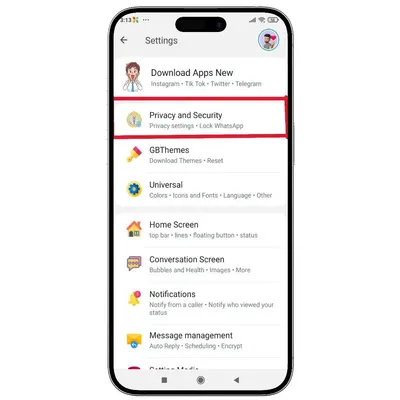
Settings overview
-
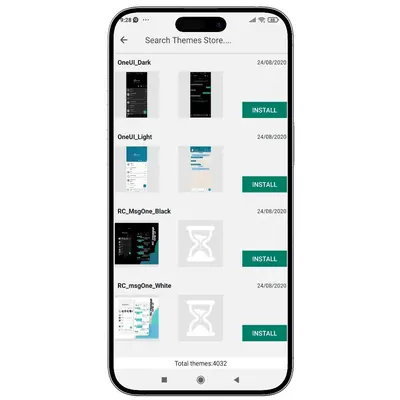
Theme store
-
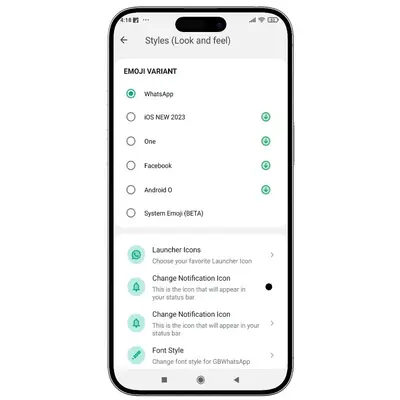
Look & feel
-
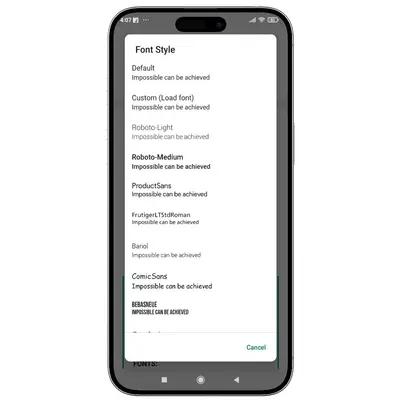
Font styles
GB WhatsApp requirements
A quick checklist so the install goes cleanly the first time.
- Operating system
- Android 5.0 (Lollipop) or higher
- Free storage
- At least 200 MB free (78 MB app + cache)
- Permission
- “Install unknown apps” enabled for your browser/file manager
- Account
- A working phone number that can receive an OTP
- Recommended
- A secondary number if you want to minimise account risk
- Not required
- No root, no PC, no payment
How to Install GB WhatsApp APK
Takes about 2 minutes. No root required.
- 1
Back up your chats (recommended)
On the official WhatsApp, go to Settings → Chats → Chat Backup → Back Up so you can restore your history into GB WhatsApp.
- 2
Download the APK
Tap the Download APK button on this page. The file GBWhatsApp-v18.80.apk saves to your Downloads folder.
- 3
Allow unknown sources
Open the file. When Android asks, enable "Allow from this source" — a standard prompt for any app outside the Play Store.
- 4
Install
Tap Install and wait 10–20 seconds for it to finish.
- 5
Verify your number
Open GB WhatsApp, enter your phone number, and verify with the OTP. Use the same number as your official app if migrating.
- 6
Restore backup (optional)
If you backed up in Step 1, tap Restore when prompted to bring back your chat history.
- 7
Done
Explore Settings → Privacy and the Theme Store to configure the features you want.
Stuck on a step? Our detailed install guide covers every Android version and what to do if installation is blocked.
What "safe" actually means here
We would rather explain our verification honestly than show a badge that means nothing. Here is exactly what we check — and what it does and doesn't prove.
VirusTotal
Every hosted APK is uploaded to VirusTotal and the report link is published. Current v18.80 build: 64/64 engines clean.
Google Play Protect
The app installs and runs with Play Protect active; you may see a standard "unknown app" prompt, which is normal for any non-Play Store APK.
File integrity
The exact file you download is the one we scanned — no ad-injected redirects or third-party repackaging.
What it does NOT mean
A clean scan confirms the file is not malware. It does not make the app official, and it does not remove the inherent risk of using an unofficial client. We state this plainly rather than hide it.
Current build v18.80 — VirusTotal scan 64/64 engines clean, last checked 22 May 2026.
View the VirusTotal report ↗Ready to download GB WhatsApp v18.80?
Latest 2026 build · 78 MB · VirusTotal clean · Updated 22 May 2026
No sign-up. No payment. Just the APK and a 2-minute install.